






Welcome to the First Chapter of Our Hands-On Course!
In dynamic robotic environments, scene graphs represent complex spatial relationships. They map “who is where” and “what connects to what” in complex, dynamic spaces. With scene graphs, robots can navigate, adapt, and interact intelligently, as you’ll see in the video of our lab simulation. By linking the scene graph to a semantic knowledge base, robots gain contextual awareness, allowing them to reason about the environment, anticipate changes, and make informed decisions.
In this chapter, you’ll learn how to create a scene graph using URDF (Unified Robot Description Format). URDF is essential because it helps define the structure, shape, and physical properties of objects, allowing robots to interact with them accurately in a simulated environment. After creating the scene graph you will extend it with semantic information, creating a semantic digital twin.
Part 1: Introduction to Scene Graphs in URDF
Goal
By the end of this session, you will have worked with a simple URDF model that includes essential objects like a fridge, a table, and other items, and visualized this setup in RVIZ.
Theoretical Background
What is URDF?
URDF stands for Unified Robot Description Format. It was originally designed for describing robots, specifically their physical structure and properties. A robot is an electromechanical device composed of multiple bodies (also called links) connected by joints. Each link represents a physical part of the robot, and joints define how these parts move relative to each other.
URDF is not limited to describing robots. In this course, we use it to define and simulate an entire environment as a scene graph, modeling furniture, objects, and other items the robot will interact with. It creates a virtual representation of an environment by defining the structure, shape, and physical properties of objects, which is crucial for realistic simulations.
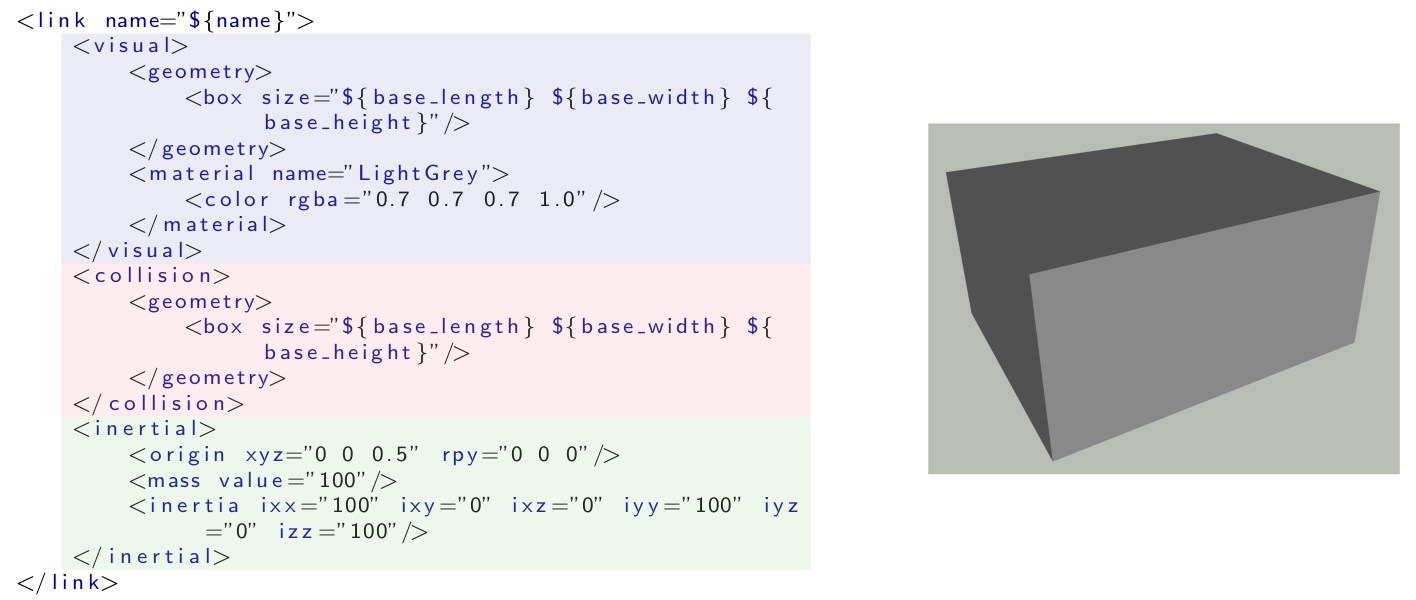
- Visual: defines how the link appears in the simulation.
- Collision: defines the simplified shape used to detect collisions, kept simpler than the visual to reduce computational load.
- Inertial: defines how the link behaves under physical forces, important for physics-based simulations like Gazebo.
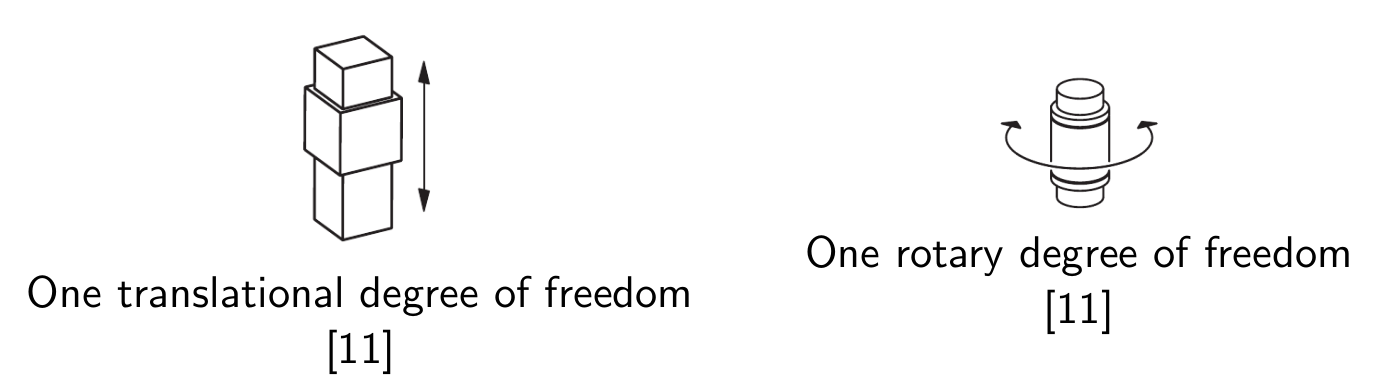
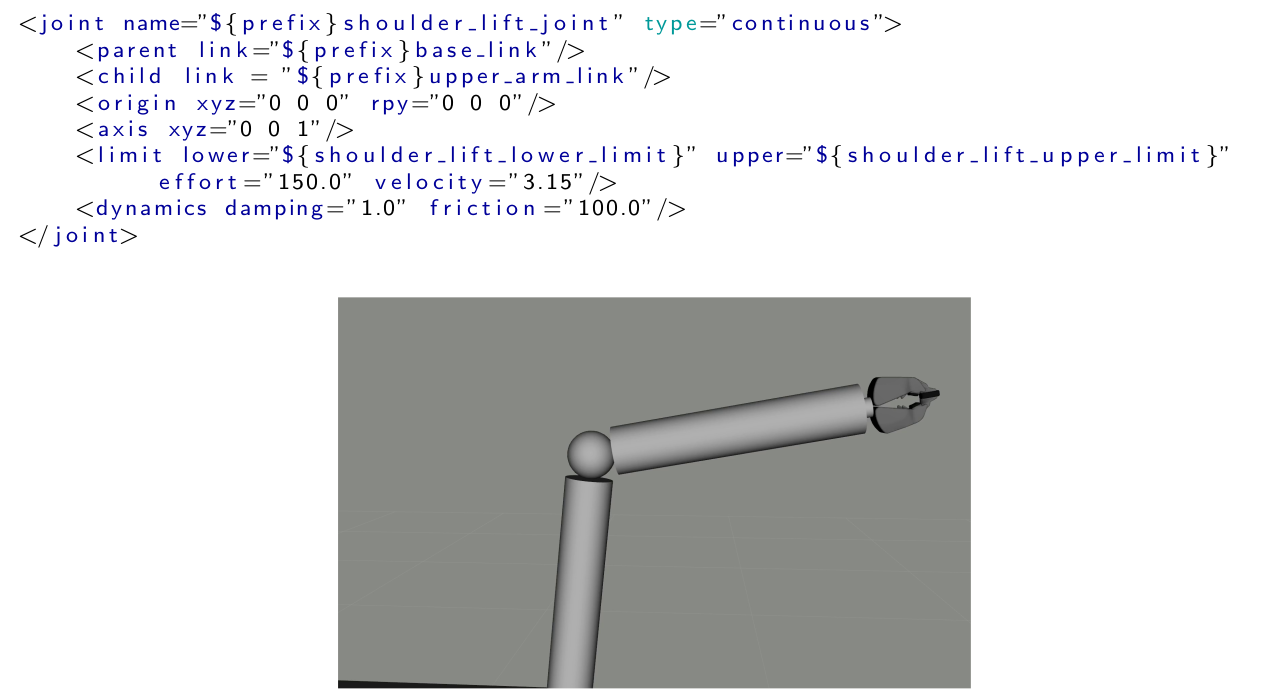
A joint in URDF defines how two links are connected and how they move relative to each other. Each joint requires specific parameters to describe its properties, such as the type of joint (e.g., revolute or prismatic), the axis of movement, and the parent and child links it connects. Additionally, limits can be defined for revolute and prismatic joints to specify the range of motion. The following image will illustrate an example of how a joint is defined in URDF for a robot arm.
Part 2: Scene Graphs and Knowledge Representation: Semantic Digital Twins
Goal
By the end of this session, you will understand how to extend the scene graph concept to represent knowledge in a semantic digital twin, allowing for richer interaction between the robot and its environment.
Theoretical Background
What is Knowledge Representation for Robotics and Why is it Important?
Knowledge representation in robotics is a way to organize information so that robots can reason about the world around them. It involves encoding the relationships between objects, actions, and properties, allowing robots to interpret and interact with their environment intelligently. Knowledge representation is important because it enables robots to make informed decisions, understand complex instructions, and adapt to dynamic environments, which is especially crucial for autonomous and cognitive robotic tasks. The diagram below shows how a knowledge processing system could look like. The scene graph is connected to the knowledge graph, which is then used by a reasoner to answer questions like "Which objects do I need for breakfast?" or "Which objects contain something to drink?"
Knowledge graphs and ontologies are a fundamental tool in knowledge representation, particularly useful for organizing and connecting information about objects, actions, and their relationships in a meaningful way. Ontologies define the core concepts, relationships, and rules in a domain — like what "Grasping" means and the requirements for it. Knowledge graphs, built on these ontologies, hold specific instances and connections, such as a particular milk carton on a table. This structure allows robots to answer targeted questions, like "What objects do I need for breakfast?". By combining both, robots gain a flexible framework for reasoning, integrating broad concepts with real-time, specific data.
What is a Semantic Digital Twin and Why is it Important?
A semantic digital twin is an enriched digital representation of a real-world entity that includes not just physical details, but also semantic information about the relationships, roles, and functions of objects. In robotics, a semantic digital twin allows a robot to understand both the physical properties of objects (e.g., shape and material) and their intended use or role in tasks. This semantic layer is crucial for enabling robots to perform complex tasks involving interactions with multiple objects and adapting to changing environments. By incorporating semantic knowledge, robots can reason more effectively about how to complete a task, making them more capable of handling unpredictable scenarios.

In practice, this is exactly what the semantic_digital_twin package provides. At its core sits a single World object: one Python mediator that holds every body, connection, and degree of freedom in the scene, and that can compute forward kinematics between any two bodies in it. The scene graph itself is a kinematic tree: Body nodes (a fridge, a table, a drawer) connected by Connection edges (Fixed, Active, or Passive), where each Active connection carries its own degrees of freedom for example, a drawer that can slide open.
Semantic annotations are what turn that plain geometry into meaning: a SemanticAnnotation attaches an actionable concept — Drawer, Handle, Container — to a body, and can express relationships between them, such as a handle that is part of a drawer. Rather than labeling every object by hand, these annotations can be learned and refined incrementally by the package's WorldReasoner, using Ripple Down Rules: a small, testable rule tree that classifies bodies into concepts and improves over time as new cases are inspected.
The world you actually work with is usually built from two halves merged into one: an Environment the static scene of rooms, furniture, and containers and a Robot, parsed separately and brought in with world.merge_world(...). Both halves are parsed the same way, from existing URDF or MJCF files, through the package's adapters — so the same tree you could build by hand in Python can equally be loaded straight from a file.
HandsOn Exercises
In the exercises you will able to create new bodies and connections, import worlds and robots, and understand the structures of the semantic digital twin
By the end of this session, you will have a working URDF environment and understand how to create and visualize a scene graph in URDF. Throughout the exercises, code examples demonstrate how to define links, joints, and meshes.
Further Reading
- An in-depth tutorial for OWL and RDF can be found here.
- Publication for the USD scene translation into knowledge graphs:
- The Semantic Digital Twin documentation can be found here
Author and Contact Details
- Yanxiang Zhan
Email: yanxiang@uni-bremen.de
Profile: Yanxiang Zhan - Sorin Arion
Email: sorin@uni-bremen.de
Profile: Sorin Arion - Vanessa Hassouna
Tel: +49 421 218 99651
Email: hassouna@cs.uni-bremen.de
Profile: Vanessa Hassouna - Dr. Michaela Kümpel
Tel: +49 421 218 64021
Email: michaela.kuempel@cs.uni-bremen.de
Profile: Michaela Kuempel - Prof. Michael Beetz, PhD
Head of Institute
Tel: +49 421 218 64001
Email: beetz@cs.uni-bremen.de
Profile: Michael Beetz